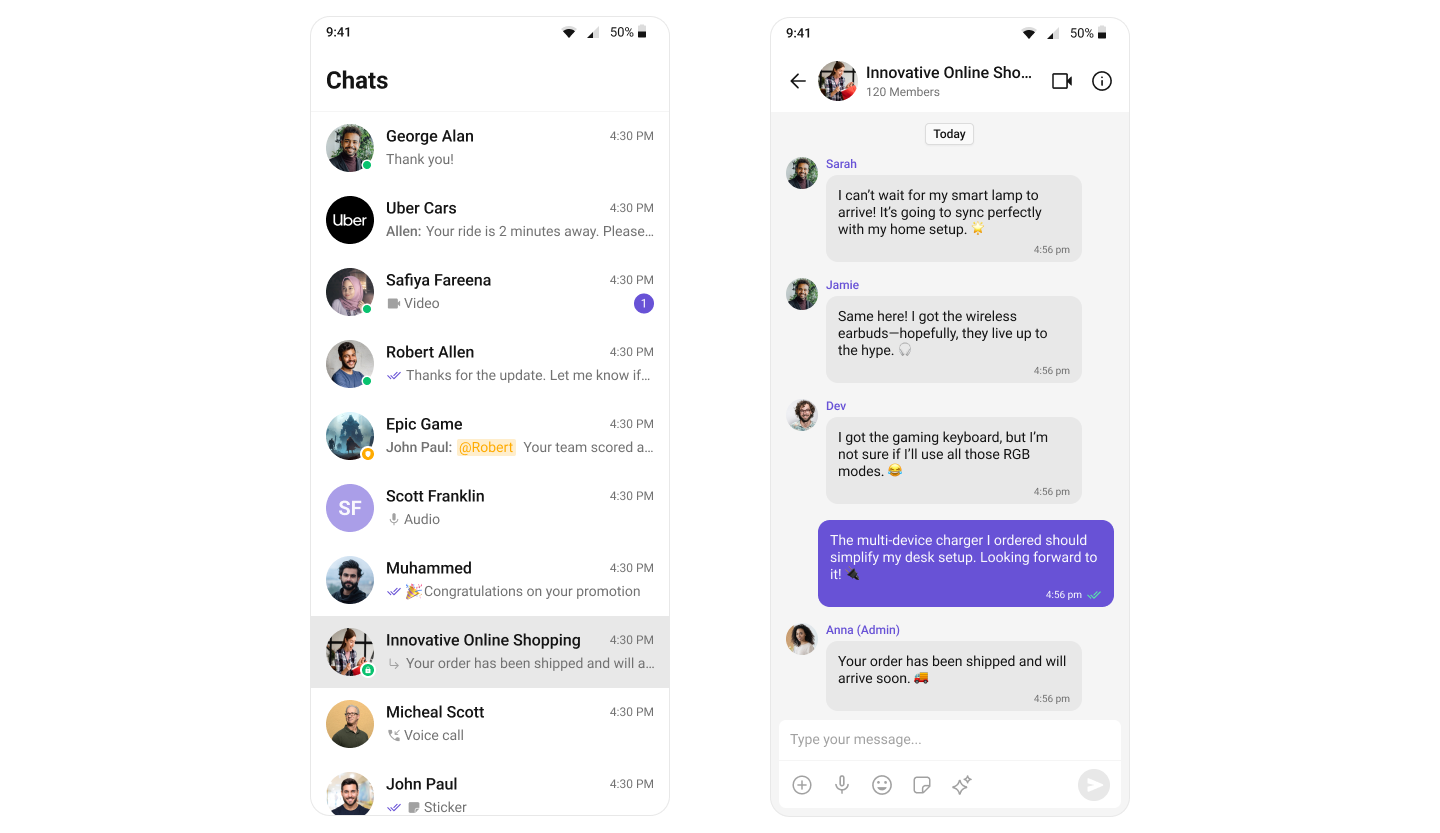
Quick Reference for AI Agents & DevelopersKey components powering core features:
- Conversations → CometChatConversations
- Message List → CometChatMessageList
- Message Composer → CometChatMessageComposer
- Message Header → CometChatMessageHeader
- Users → CometChatUsers
- Groups → CometChatGroups
- Group Members → CometChatGroupMembers
Overview
The UI Kit comprises a variety of components, each designed to work seamlessly with one another to deliver a comprehensive and intuitive chat experience. Here’s how different UI Kit components work together to achieve CometChat’s core features:Instant Messaging
At the heart of CometChat’s functionality is the ability to support real-time text messaging. Users can send and receive instant messages, fostering quick and efficient communication.
| Components | Functionality |
|---|---|
| MessageComposer | MessageComposer component allows users to compose and send different types of messages with ease. |
| MessageList | MessageList component renders a list of messages sent and messages received using TextBubble. |
Media Sharing
Beyond text, CometChat allows users to share various media types within their conversations. This includes images, videos, audio files, and documents, enriching the chat experience and enabling more comprehensive communication.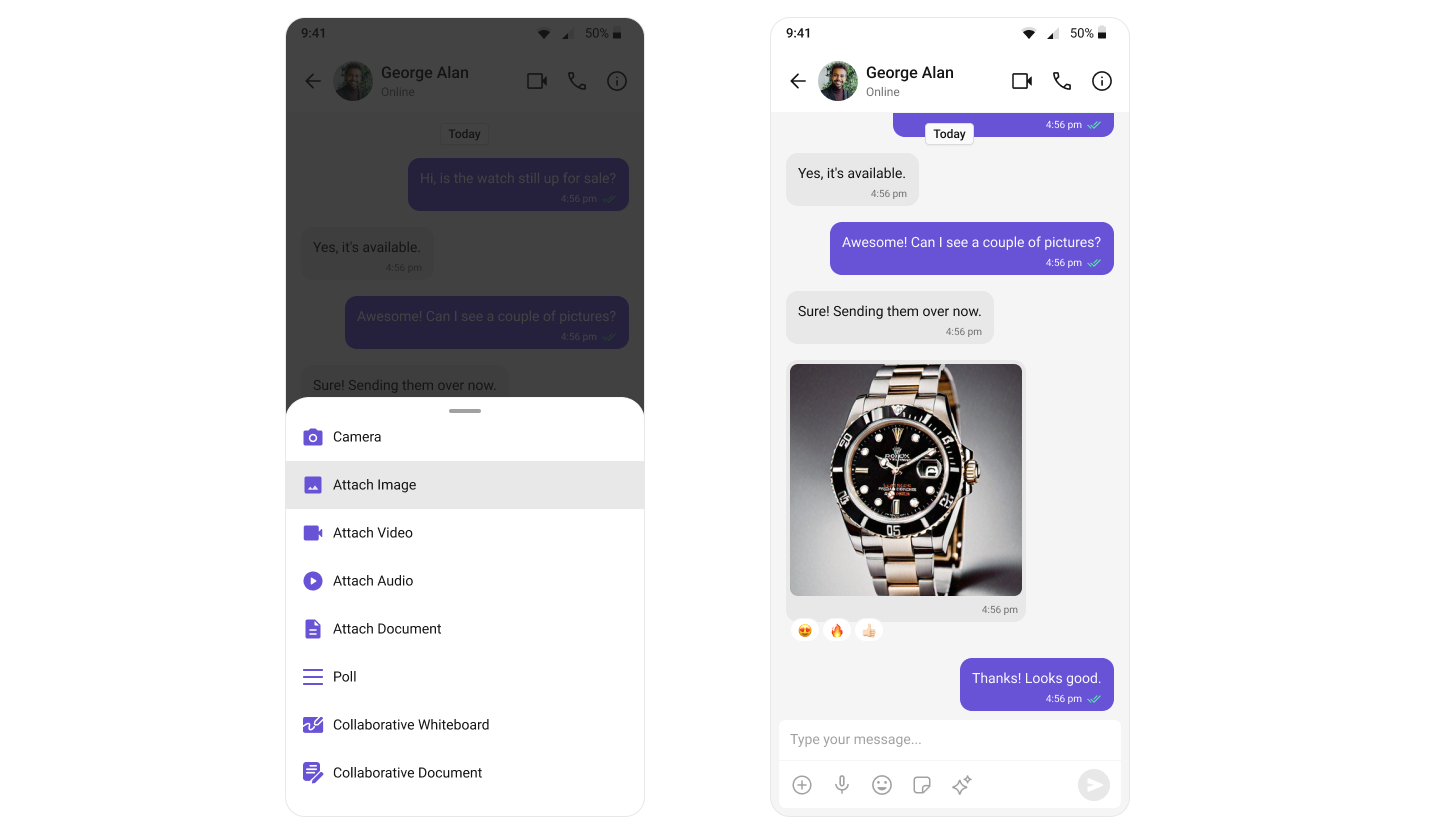
| Components | Functionality |
|---|---|
| MessageComposer | MessageComposer contains an ActionSheet component — a contextual menu overlay that provides multiple options for sharing media files. |
| MessageList | MessageList component displays various media message bubbles, including Image Bubble, File Bubble, Audio Bubble, Video Bubble |
A complete messaging interface can be built by combining three key components: MessageHeader, MessageList, and MessageComposer.
Read Receipts
CometChat’s Read Receipts feature provides visibility into message status, letting users know when a message has been delivered and read. This brings clarity to communication and ensures users are informed about the status of their messages.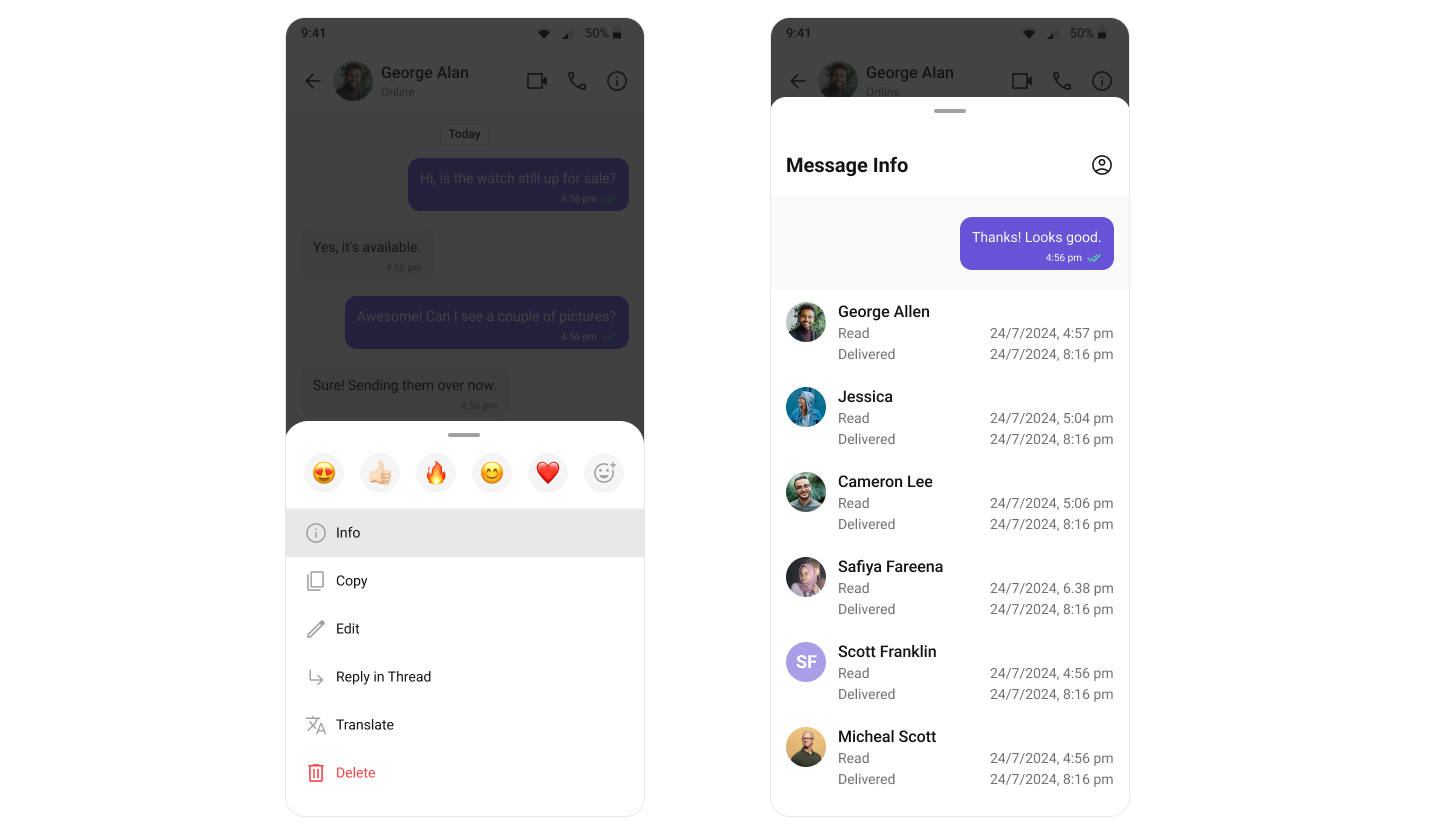
| Components | Functionality |
|---|---|
| Conversations | Conversations component renders a conversation item list. Each item also displays the delivery status of the last message, providing users with real-time updates on message status. |
| MessageList | MessageList component renders different types of message bubbles. Read receipt status is an integral part of all message bubbles, regardless of type, and provides real-time updates about message status. |
| MessageInformation | MessageInformation component provides transparency into the status of each sent message, giving the sender insights into whether their message has been delivered and read. |
Mark as Unread
The Mark as Unread feature allows users to manually mark messages as unread, helping them keep track of important conversations they want to revisit later. When enabled, the message list can automatically start from the first unread message, making it easier to pick up where you left off.
| Components | Functionality |
|---|---|
| Message List | Message List provides the “Mark as unread” option in message actions and supports starting from the first unread message when enabled. |
| Conversations | Conversations component listens to conversation updates and reflects the updated unread count in real-time. |
Typing Indicator
The Typing Indicator feature shows when a user is typing a response in real-time, fostering a more interactive and engaging chat environment. This enhances the real-time communication experience, making conversations feel more natural and fluid.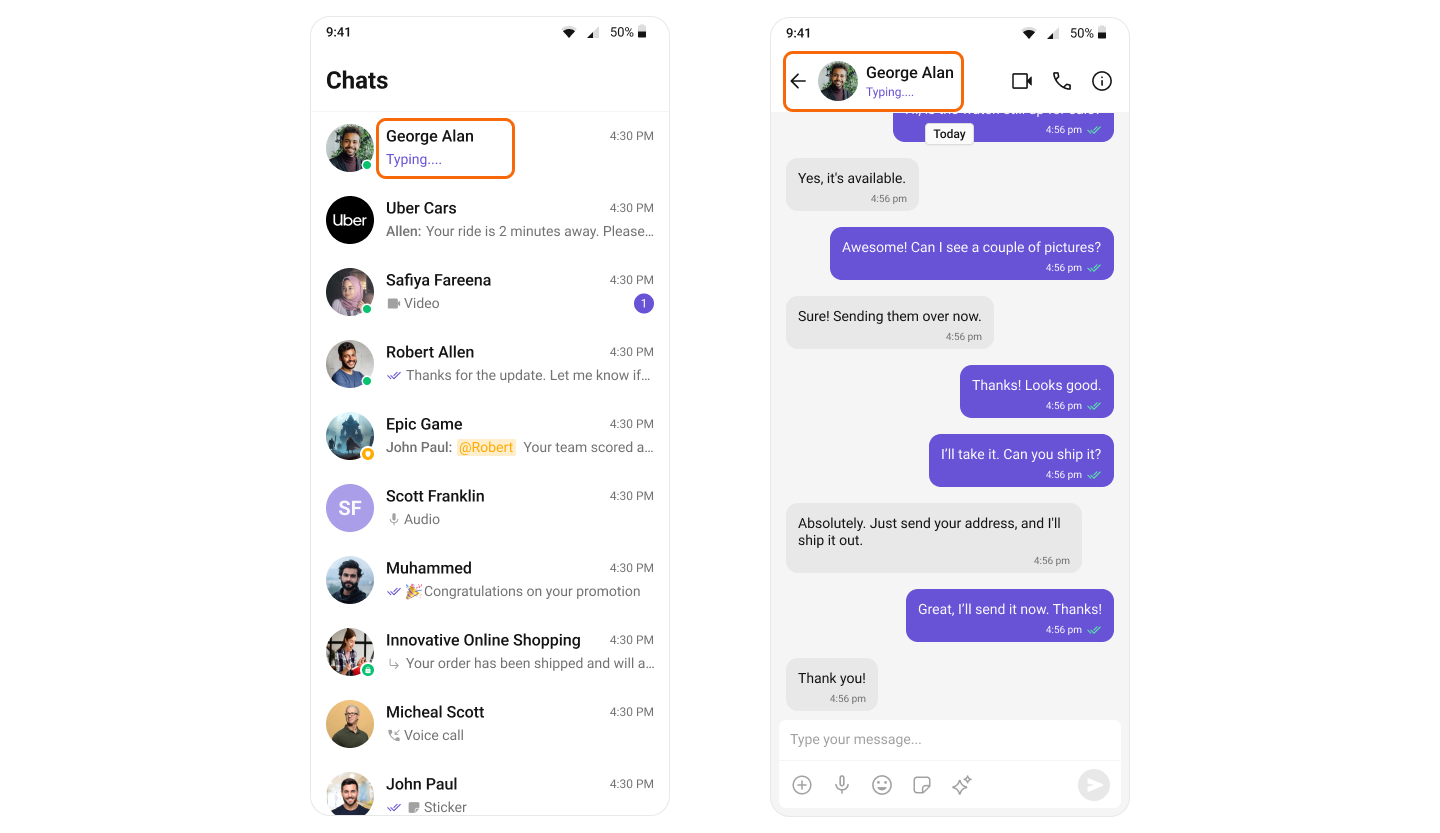
| Components | Functionality |
|---|---|
| Conversations | Conversations component renders a list of conversation items, each displaying real-time typing indicators. If a user in a one-on-one or group chat is currently typing, the status is reflected instantly in the conversation list. |
| Message Header | Message Header component displays user or group details in the toolbar. It also manages the typing indicator, dynamically updating to show a real-time “typing…” status when a user or group member is actively typing. |
User Presence
CometChat’s User Presence feature lets users see the online or offline status of their contacts, helping them choose the right time to start a conversation and set expectations for response times.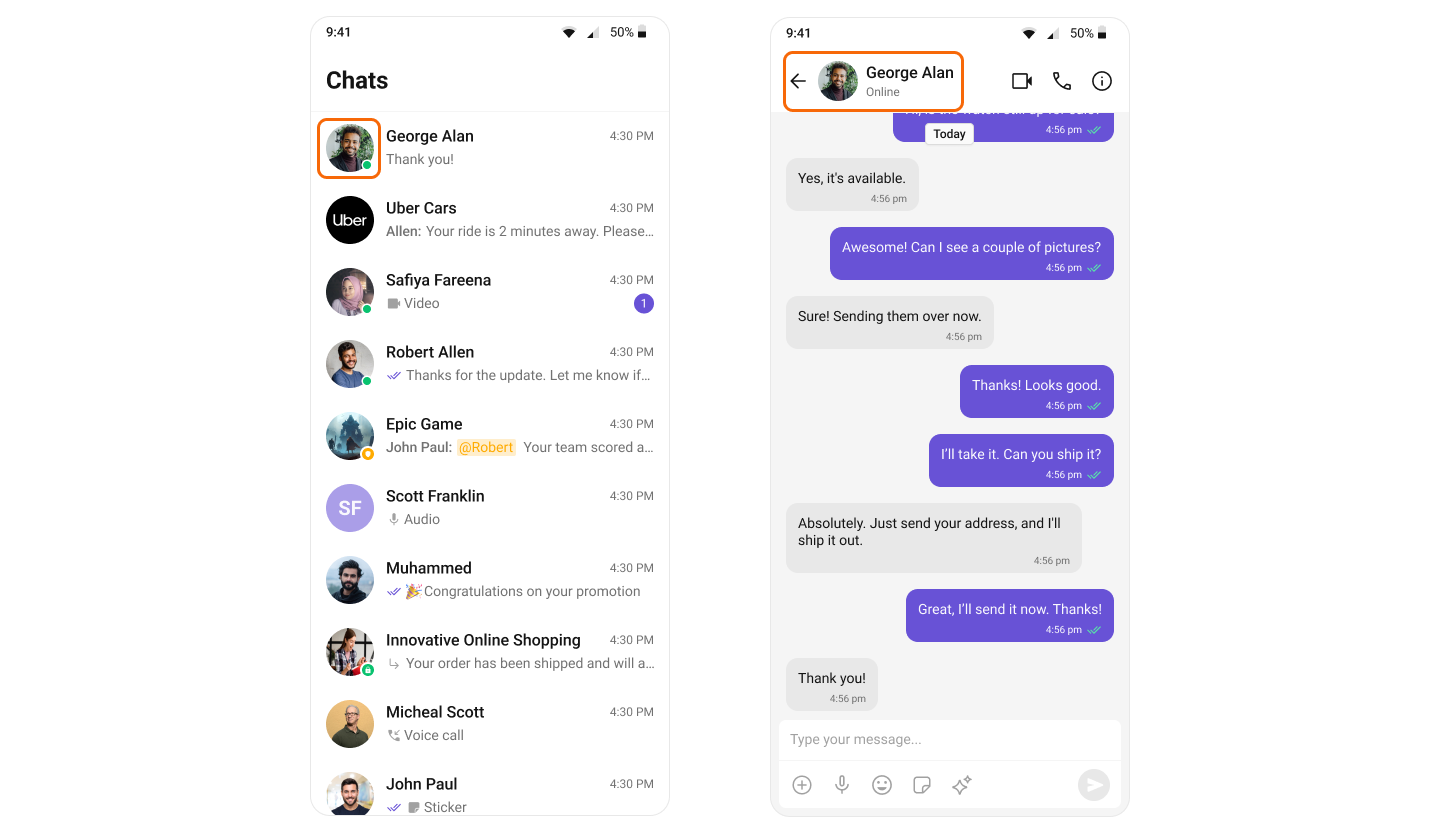
| Components | Functionality |
|---|---|
| Conversations | Conversations component renders a list of conversation items, each displaying user presence information such as online or offline status. |
| MessageHeader | Message Header component displays user or group details in the toolbar. It also handles user presence, showing real-time online or offline status for the selected user. |
| Users | Users component displays a list of users available in your app and is also responsible for showing their real-time presence status such as online or offline. |
| GroupMembers | Group Members component displays a list of users within a group and also manages real-time presence information, showing whether each member is online or offline. |
Reactions
CometChat’s Reactions feature adds a layer of expressiveness to your chat application by allowing users to react to messages. With Reactions, users can convey a range of emotions or express their thoughts on a particular message without typing out a full response, enhancing the user experience and fostering greater engagement.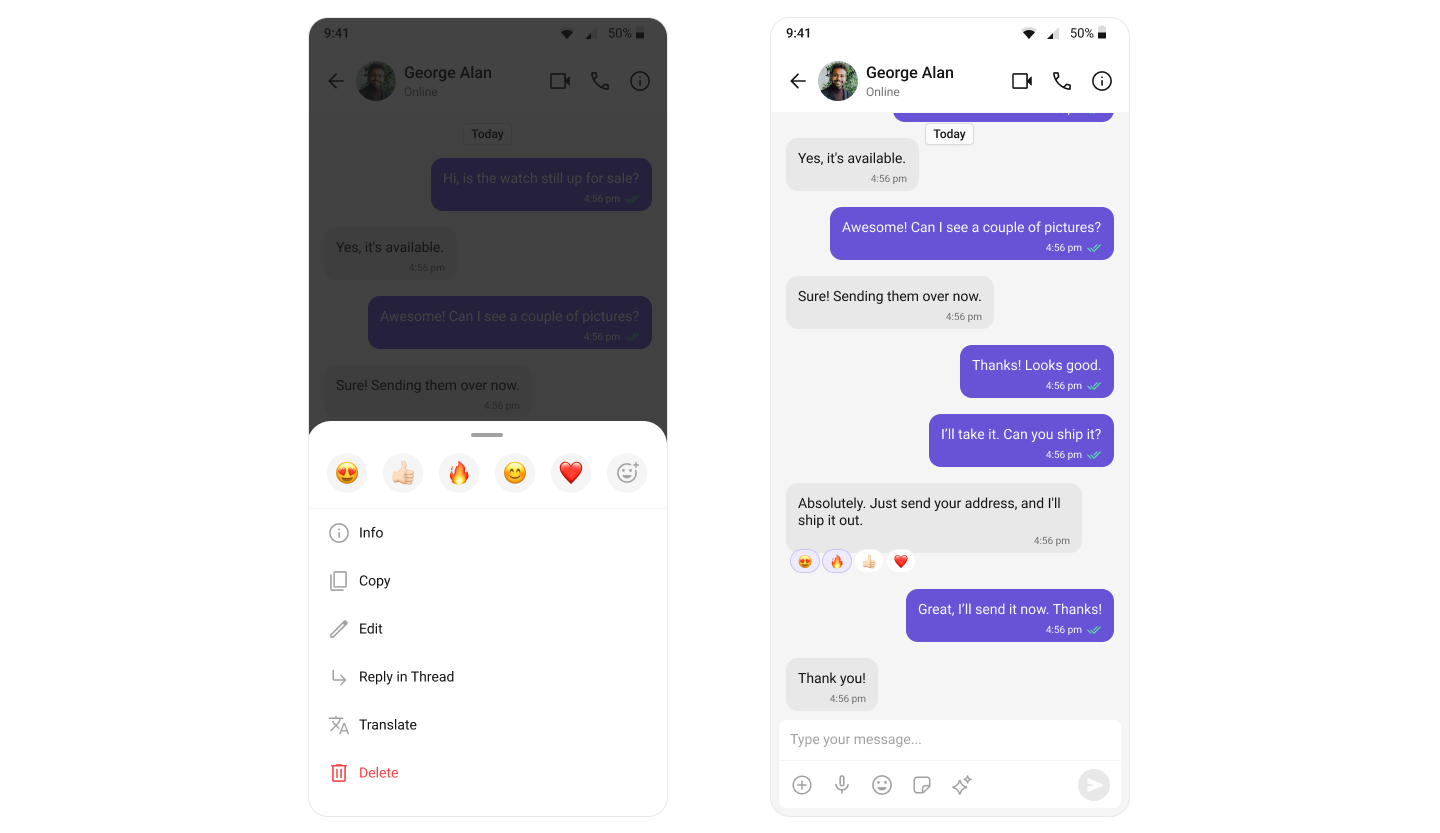
| Components | Functionality |
|---|---|
| MessageList | MessageList component renders various types of message bubbles. Regardless of the message type, reactions are seamlessly integrated, allowing users to respond in a more engaging and expressive way. |
Mentions
Mentions is a feature that enhances the interactivity and clarity of group or 1-on-1 chats by allowing users to directly address or refer to specific individuals in a conversation.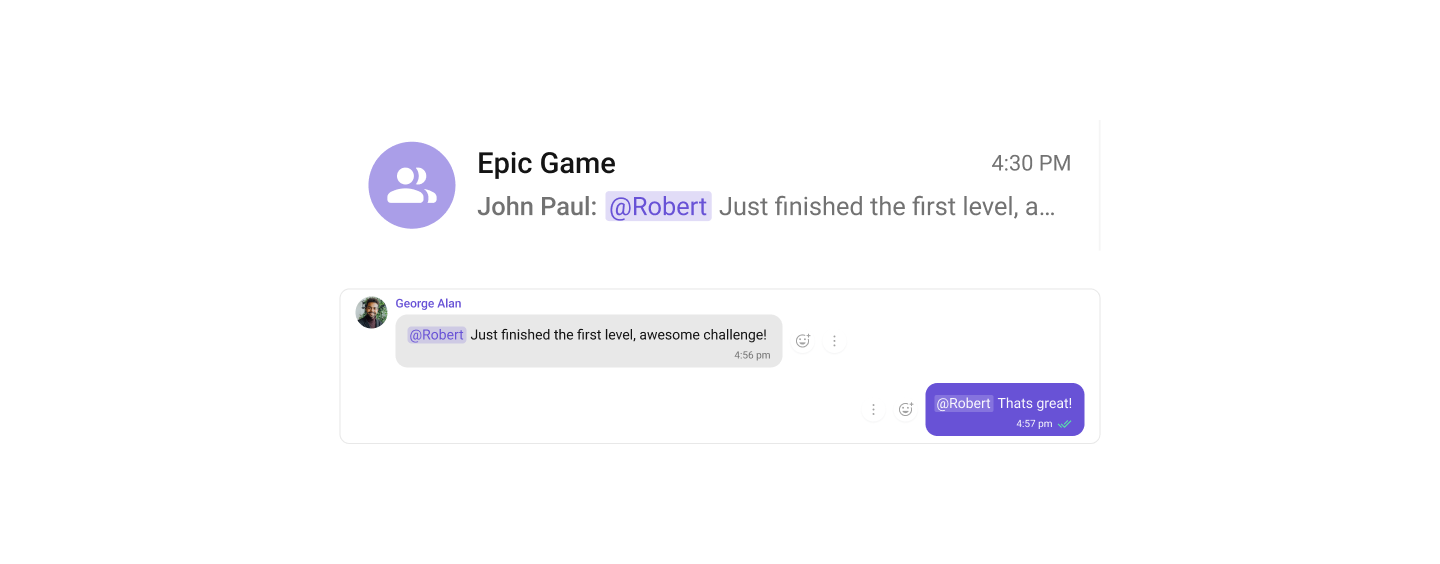
| Components | Functionality |
|---|---|
| Conversations | Conversations component integrates the Mentions feature, allowing users to see directly from the conversation list when they or others have been specifically mentioned in a chat. |
| MessageComposer | MessageComposer component allows users to compose and send various types of messages, including support for the Mentions feature to directly address participants within the conversation. |
| MessageList | MessageList component displays a list of sent and received messages. It also supports rendering Mentions, enhancing the clarity and interactivity of conversations by highlighting direct references to users. |
Quoted Reply
The Quoted Reply feature enables users to quickly reply to specific messages by selecting the “Reply” option from a message’s action menu. This enhances context, keeps conversations organized, and improves the overall chat experience in both 1-on-1 and group chats.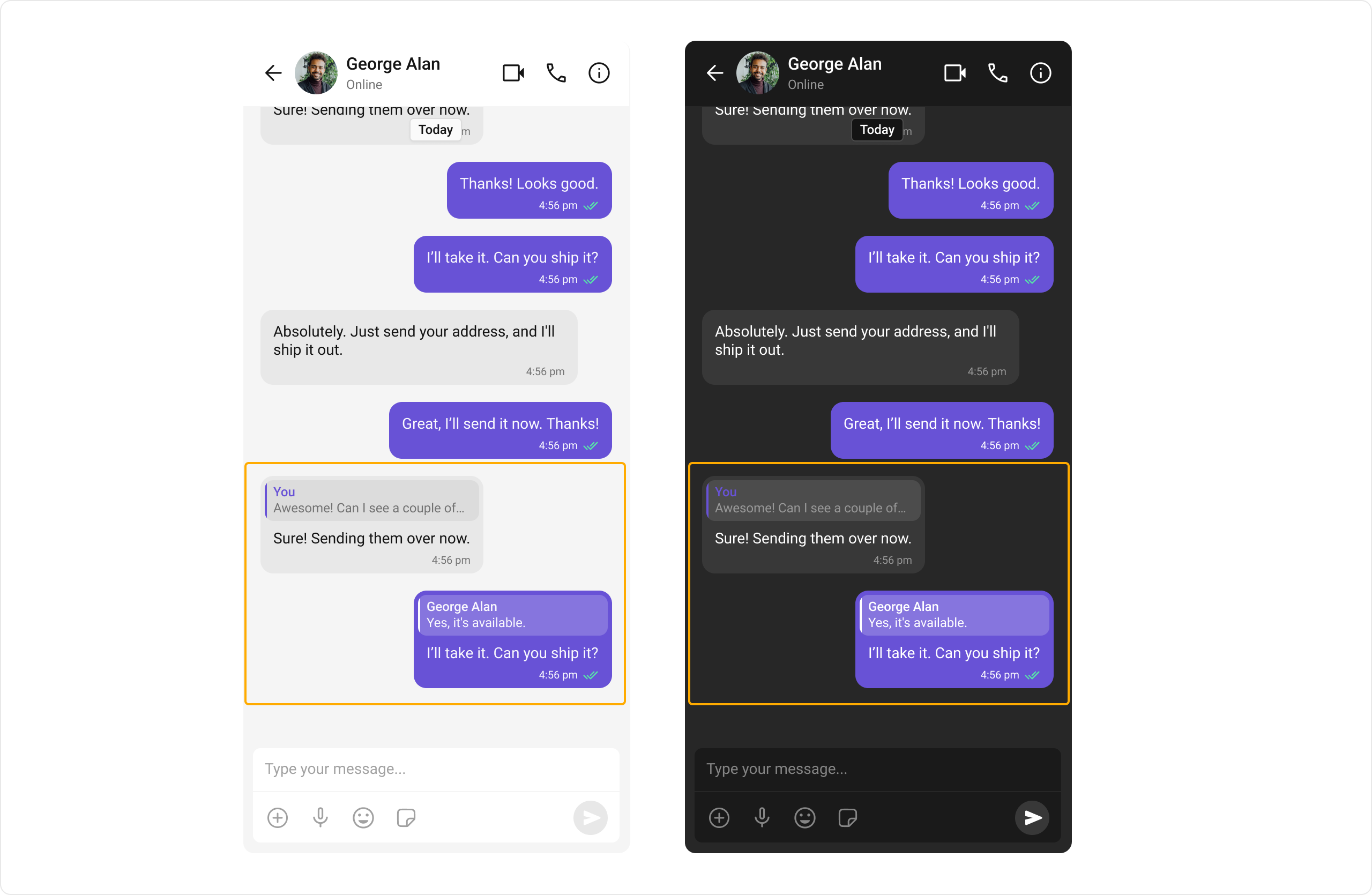
| Components | Functionality |
|---|---|
| Message List | Message List supports replying to messages via the “Reply” option. Users can select “Reply” on a message to open the composer with the quoted reply pre-filled, maintaining context. |
| Message Composer | Message Composer works seamlessly with Quoted Reply by showing the quoted message above the input field, letting users compose their response in proper context. |
Conversation and Advanced Search
Conversation and Advanced Search enables users to quickly find conversations, messages, and media across chats in real time. It supports filters, scopes, and custom actions, allowing users to locate content efficiently while keeping the chat experience smooth and intuitive.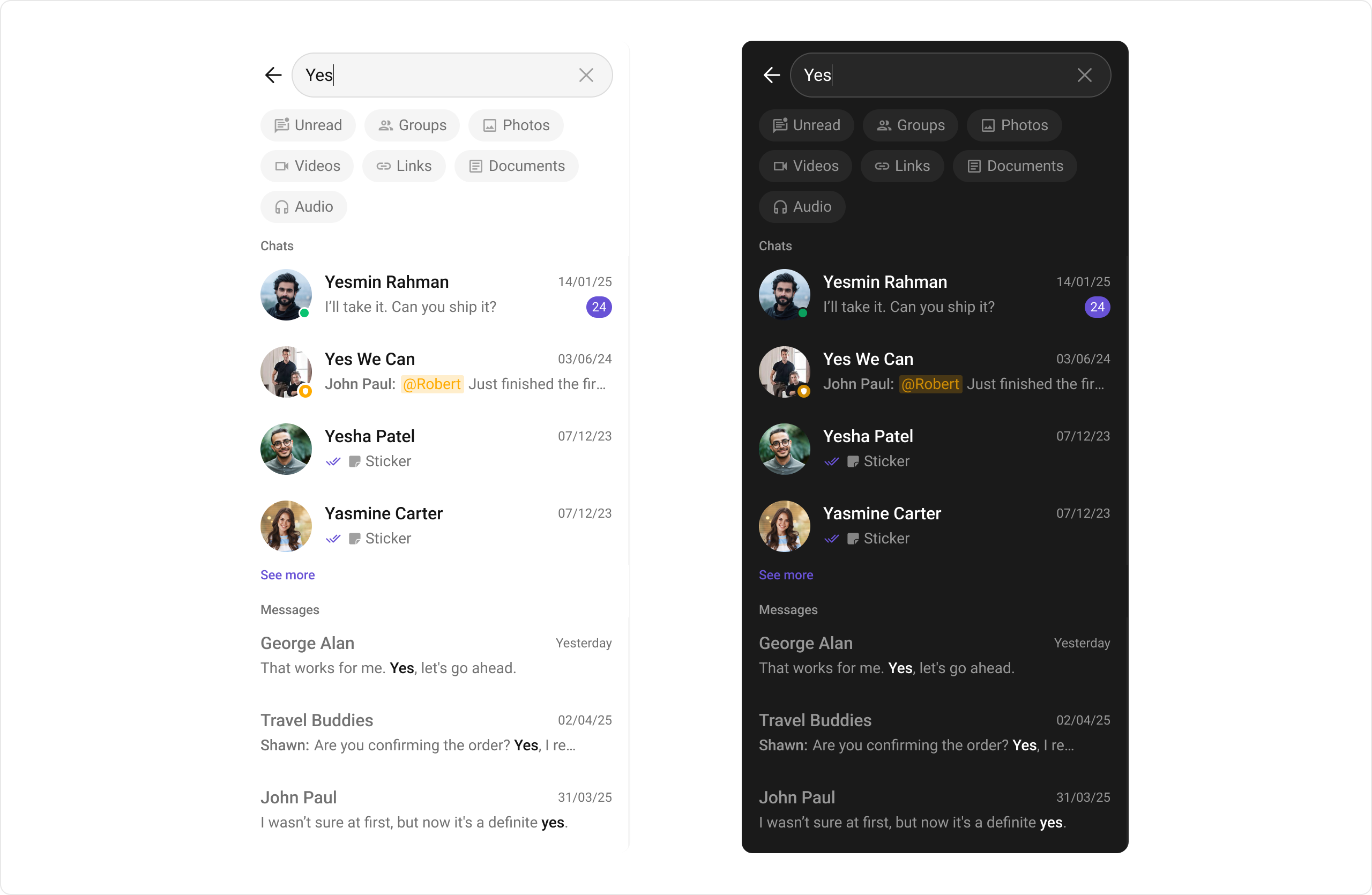
| Components | Functionality |
|---|---|
| Search | Search allows users to search across conversations and messages in real time. Users can click on a result to open the conversation or jump directly to a specific message. |
| Message Header | Message Header shows the search button in the chat header, allowing users to search within a conversation. |
| Message List | Message List shows the selected message when clicked from search results and highlights it in the message list. |
| Conversations | Conversations displays the search input. |
Moderation
CometChat’s Message Moderation feature helps maintain a safe and respectful chat environment by automatically filtering and managing inappropriate content. Messages can be automatically blocked or flagged based on predefined rules, ensuring harmful content is handled before it reaches users.
Learn more about setting up moderation rules and managing content in the Moderation documentation.
| Components | Functionality |
|---|---|
| Message List | Message List automatically handles moderated messages, displaying blocked content appropriately based on your moderation settings. |
Report Message
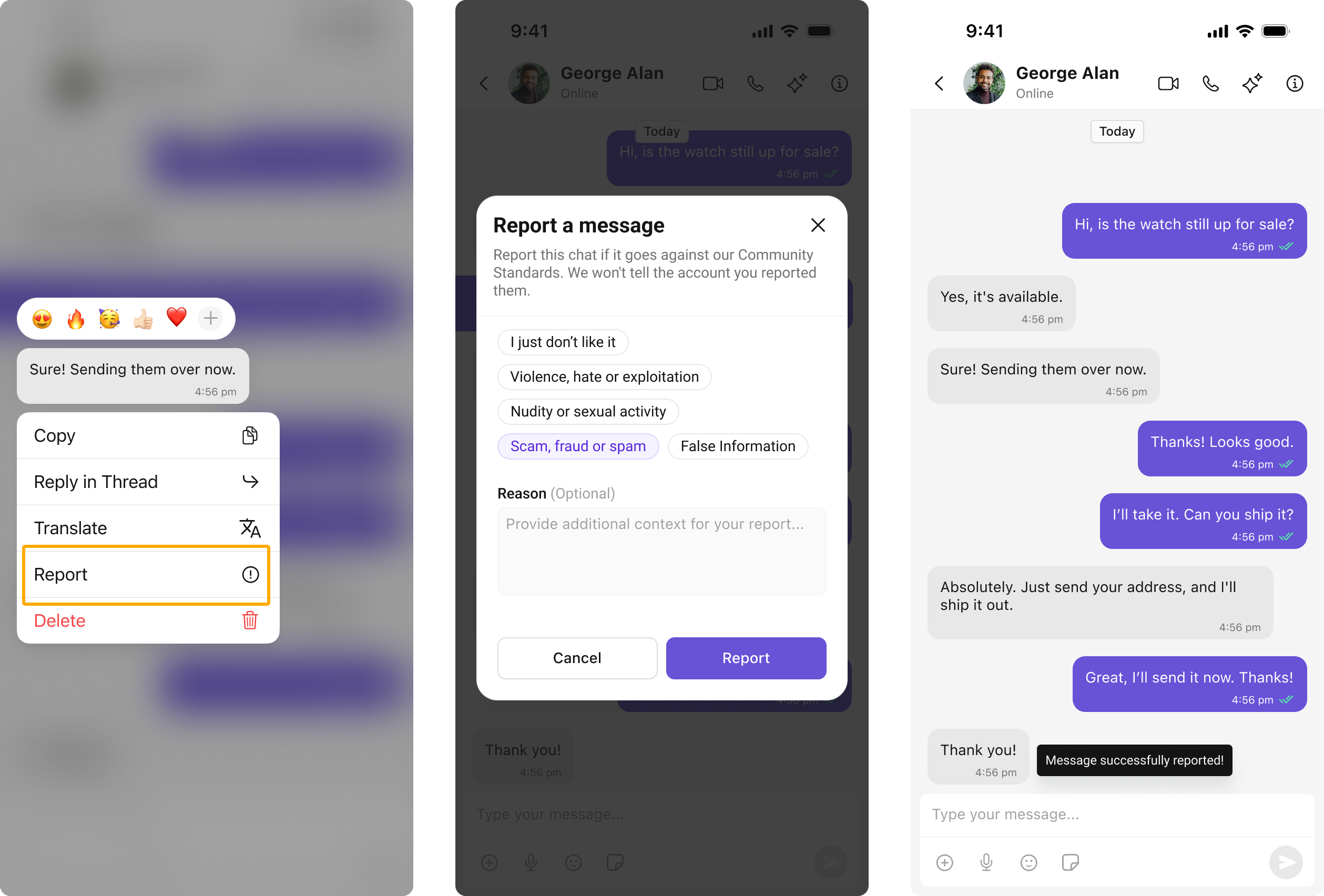
The Report Message feature allows users to report inappropriate or harmful messages within the chat. Users can choose from predefined reasons and provide additional remarks for detailed context. This feature helps maintain a safe and respectful chat environment.Learn more about how flagged messages are handled, reviewed, and moderated in the Flagged Messages documentation.
| Components | Functionality |
|---|---|
| Message List | Message List provides the “Report Message” option in the message actions menu, allowing users to initiate the reporting process for inappropriate messages. |
Threaded Conversations
The Threaded Conversations feature enables users to respond directly to a specific message in a chat. This keeps conversations organized and enhances the user experience by maintaining context, especially in group chats.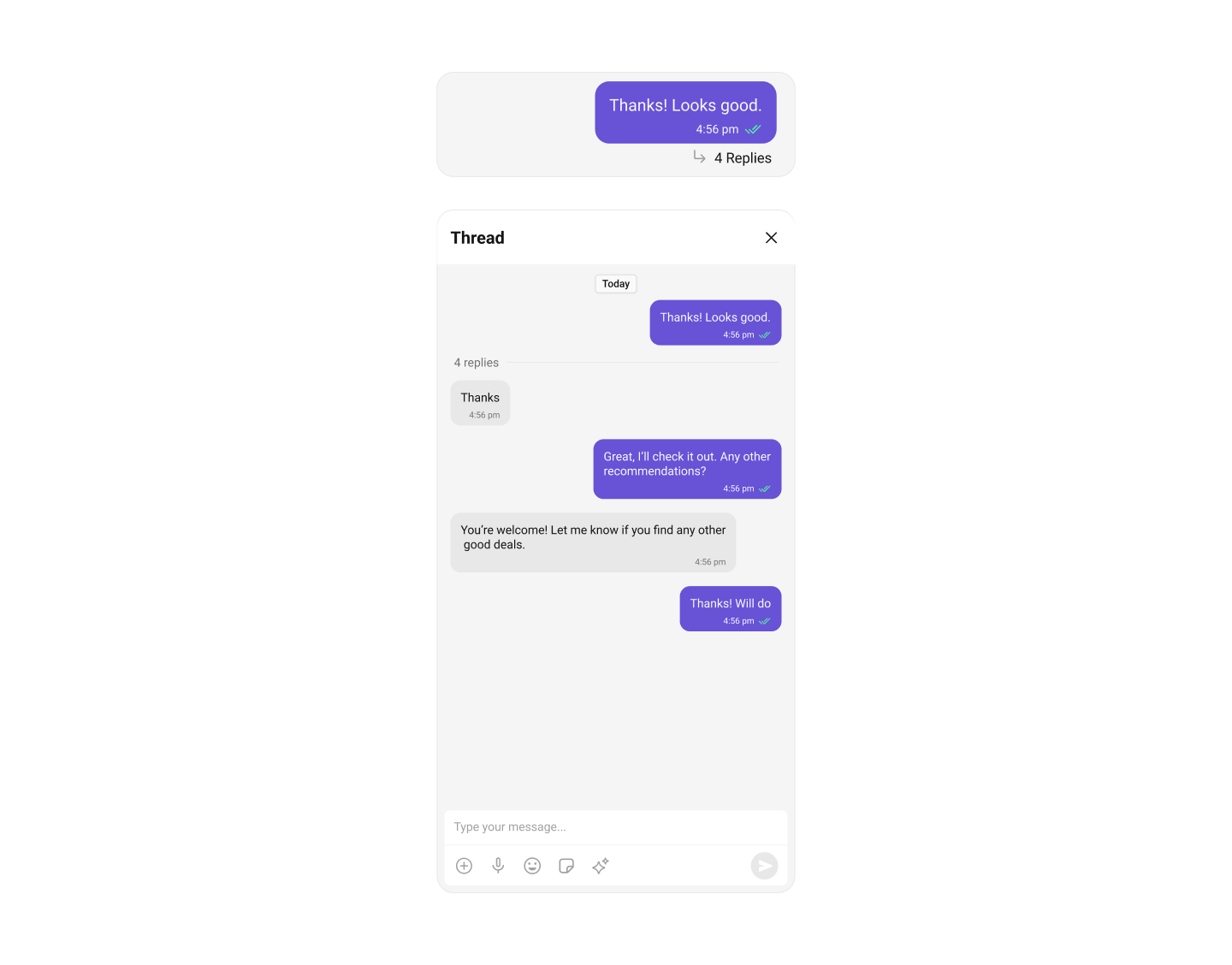
| Components | Functionality |
|---|---|
| Threaded Header | Threaded Header component displays the original message along with all its replies, helping users follow the context of a threaded conversation. |
| MessageComposer | MessageComposer component enables users to compose and send various types of messages. |
| MessageList | MessageList component displays a chronological list of sent and received messages. It also supports Mentions, making conversations more interactive and easier to follow by highlighting direct references to users. |
Group Chat
CometChat facilitates Group Chats, allowing users to have conversations with multiple participants simultaneously. This feature is crucial for team collaborations, group discussions, social communities, and more.